 THE GLOWNIQUE
Custom Gaming Neon Signs: Streaming Setup, Camera Glare & Sizing Guide
Adding a custom LED neon sign behind your gaming desk or streaming battlestation instantly elevates your backdrop on Twitch, YouTube, and Discord. Here is our workshop guide to controlling webcam lens glare, avoiding rolling shutter flicker, sizing your gamertag, and mounting on acoustic foam panels.
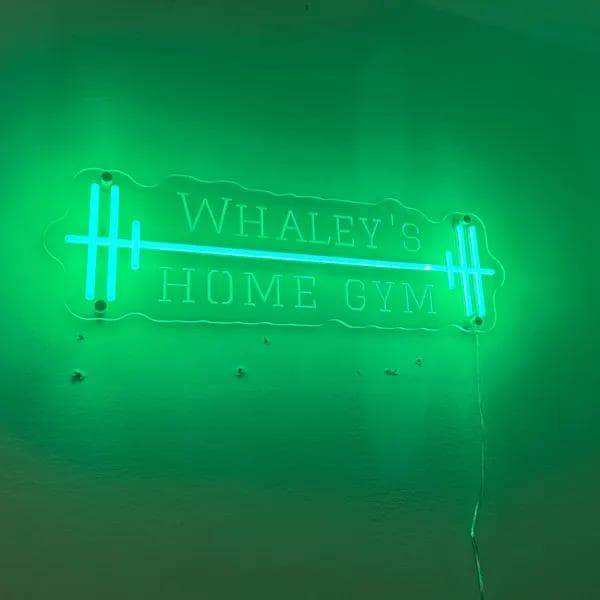
Key takeaways
- Camera exposure balance: Dim your neon sign to 20%–40% on stream so your webcam exposes both your face and the glowing text cleanly.
- Flicker-free high-frequency PWM: Certified dimmers prevent dark rolling shutter scanlines on 60FPS and 120FPS camera feeds.
- Field-of-view sizing: A 36–48 inch sign behind your chair fits naturally within standard 78°–90° webcam angles without edge cutoff.
- Acoustic foam mounting: Anchor standoffs through foam cut-outs directly into drywall to maintain secure mounting and airflow.
- Low heat & energy efficiency: Modern 12V LED neon runs cool and consumes only 20–40W, making it safe for long daily gaming sessions.
Whether you are building a dedicated streaming studio for Twitch and YouTube or elevating a clean gaming battlestation, an illuminated neon sign is the single highest-impact backdrop upgrade you can make. A glowing gamertag, clan emblem, or controller silhouette immediately turns a plain bedroom wall into a branded broadcast studio.
However, streaming cameras (webcams and mirrorless capture cards alike) handle light very differently than human eyes. If your neon sign is too bright, the camera sensor will overexpose, turning your sharp logo into a blinding white glare while darkening your face. Here is how to dial in sizing, placement, and lighting frequency for a camera-ready creator setup.
1. Sizing Your Gamertag for Camera Field of View (FOV)
When selecting dimensions for a game room sign, consider what your webcam actually captures behind your chair. Most desktop streaming cameras use a 78° to 90° field of view (FOV), meaning anything placed too far to the edges gets cropped out of your stream layout.
| Setup Location | Viewing / Camera Dist | Recommended Sign Width | Best Mount Height |
|---|---|---|---|
| Directly Above Monitor Setup | 3–5 feet (0.9–1.5 m) | 24–36 inches (60–90 cm) | 6–10 inches above top screen bezel |
| Streamer Backdrop (Behind Chair) | 6–10 feet (1.8–3.0 m) | 36–48 inches (90–120 cm) | Eye-level when seated in gaming chair |
| Wide Studio Wall / Lounge | 10–18+ feet (3.0–5.5 m) | 48–65 inches (120–165 cm) | Centered vertically at 60 inches from floor |
Sizing optimized for 1080p/4K 16:9 streaming camera frames.
2. Eliminating Camera Glare & Rolling Shutter Flicker
Two technical issues ruin gaming neon setups on video: overexposure blow-out and rolling shutter banding. Both are solved with the right dimming hardware.
Cheap analog LED dimmers cycle at low frequencies (under 200Hz), creating dark horizontal scan lines on 60FPS webcams. All The Glownique custom signs utilize high-frequency pulse-width modulation (PWM) dimming to ensure 100% flicker-free capture at 60FPS, 120FPS, and 4K broadcast frame rates.
3. Mounting on Acoustic Foam, Slat Walls & Drywall
Most creator studios feature sound absorption materials. Here is how to mount your acrylic backboard safely across different studio surfaces:
- Acoustic Foam Tiles: Do not glue or screw neon directly into soft foam. Cut a small square out of the foam tile, screw a standoff anchor directly into the drywall behind, and float the acrylic 20mm off the surface.
- Modern Wood Slat Panels: Secure mounting screws between felt slats into the backing substrate using black or brass standoff barrels.
- RGB & Cyberpunk Color Palette: Cyberpunk Cyan, Electric Magenta, Lime Green, and Deep Violet create high-contrast visuals that complement RGB PC builds and dynamic backlighting.
In a streaming room, cable management is everything. Run the clear low-voltage power lead along monitor arms or desk frames with adhesive clips so zero wires clutter your camera frame.
Explore More Studio Signage Guides
Looking to expand your battlestation setup? Explore our guide on custom sign cost breakdown, or view our custom business and creator logo signs.
Frequently asked questions
- How do I prevent my neon sign from looking too bright on webcam?
- Yes. Lower the brightness to 25%–40% using the wireless dimmer remote. This prevents your webcam's auto-exposure from darkening your face while keeping the neon letters crisp, saturated, and completely legible on stream.
- Why does my neon sign flicker on camera or video recording?
- Camera flicker occurs when cheap dimmers modulate light at low frequencies (under 200Hz). The Glownique uses high-frequency PWM dimmers that eliminate shutter banding, ensuring smooth capture at 60FPS, 120FPS, and 4K recording.
- What size neon sign is best for a Twitch or YouTube streaming backdrop?
- For a sign placed behind your gaming chair (6 to 10 feet from camera), a width of 36 to 48 inches (90–120 cm) ensures your gamertag remains clearly visible within standard 16:9 webcam framing without being obscured by your head.
- Can you mount a neon sign directly onto acoustic soundproofing foam?
- Do not mount heavy signs into soft foam directly. Cut small holes in the foam tile to anchor standoff barrels directly into the drywall substrate behind, floating the acrylic 20mm off the wall for proper ventilation.
- How much electricity does a gaming neon sign use during long streams?
- An average 36-inch LED neon sign consumes only 20 to 40 watts of low-voltage DC power (similar to a small desk lamp), costing only a few pennies per day even during marathon 10-hour streaming sessions.
Sources
- Webcam Sensor Dynamic Range and Highlight Clipping Mitigation — Society of Motion Picture and Television Engineers (SMPTE) Broadcast Guidelines (accessed 25 August 2026)
- Pulse-Width Modulation Frequency and Camera Strobe Immunity in Solid-State Lighting — IEEE Standard 1789 for LED Lighting Flicker Mitigation (accessed 25 August 2026)
Turn the idea into a sign
Send us your logo, words or a rough sketch and we'll come back with a free digital mockup and a quote for your exact size — before anything is built.